To avoid email marketing mistakes, send useful messages to people who signed up, test each campaign, and track real results. Start with a clear goal, then check your audience, email content, sending setup, and links before launch.
When email campaigns struggle, the subject line is only one place to look. The offer may reach the wrong group, the checkout link may fail, or an automated flow may send too often.
Each problem needs a different fix. This guide explains what to check, why it matters, and how to improve the next campaign.
Test before launch. Send a test campaign to your team using a test contact with realistic subscriber data. Check both a complete profile and one with missing fields.
Strategy and Email List Mistakes
Good email marketing starts before you write the message. A clear goal and a well-managed subscriber list give each campaign a useful purpose.
1. Sending Without a Clear Campaign Goal
An email can look polished and still leave readers unsure what to do. This often happens when the team starts with a send date instead of a goal.
Choose the main action first, such as a purchase, demo booking, or event signup. Then match the audience, offer, and message to that action.
For a webinar campaign, explain who the session helps and what attendees will learn. Keep registration as the main next step, and measure completed signups.
Keep the goal in the campaign brief. This gives the writer, designer, and reviewer the same measure of success.
2. Buying Lists or Skipping Permission
A valid email address does not mean someone wants your newsletter. Purchased lists can include people who have no interest in your business.
Build your list through clear signup forms and keep records of when and how people joined. Explain what you plan to send.
A download request should not quietly become a signup for unrelated promotions. Make the marketing choice clear.
Double opt-in adds a confirmation email to the signup process. It helps check that the person controls the address they entered.
Check the signup source before importing contacts. Keep that record with the list so your team can review permission later.
3. Making Signup Hard or Unclear
A long form can ask for more than someone wants to share. A vague invitation also gives them little reason to subscribe.
Ask for the details you need at that stage. Explain the benefit, whether it is product updates, useful advice, or early access to offers.
For example, “Get weekly skincare tips and product updates” sets a clearer expectation than “Join our list.”
Test the whole signup process on a phone. Confirm that the contact reaches the right list and receives any promised resource.
If the form promises a discount, check that the welcome email contains the correct code and terms.
4. Sending the Same Message to Every Contact
A new subscriber and a loyal customer may need different emails. Sending both the same offer can overlook what they already know or bought.
Use audience segmentation to group contacts by interests, purchase history, or lifecycle stage. Lifecycle stage describes where someone is in their relationship with your business.
A skincare store could send refill reminders to past buyers. A B2B firm could send a case study to leads interested in that service.
Check exclusions too, so recent buyers do not receive offers meant only for first-time customers.
Preview the final segment before scheduling. Check sample records to confirm the rules include the right people.
5. Ignoring List Hygiene and Unsubscribe Requests
List hygiene means keeping contact data and sending permissions up to date. Old records can lead to failed deliveries or unwanted messages.
Keep invalid addresses, unsubscribed contacts, and known spam complainants off future marketing sends. Retain suppression records so a later import does not add them back.
Review inactive subscribers using clicks, purchases, and other activity, rather than opens alone. Where appropriate, try a re-engagement campaign before stopping further marketing emails.
Make unsubscribing easy, and test that the request updates the contact record.
Check connected signup tools too. An unsubscribe must stay in place when data moves between your systems.
With the audience and list checked, review the email itself. The next six mistakes cover sender identity, content, design, and testing.
Email Copy and Design Mistakes
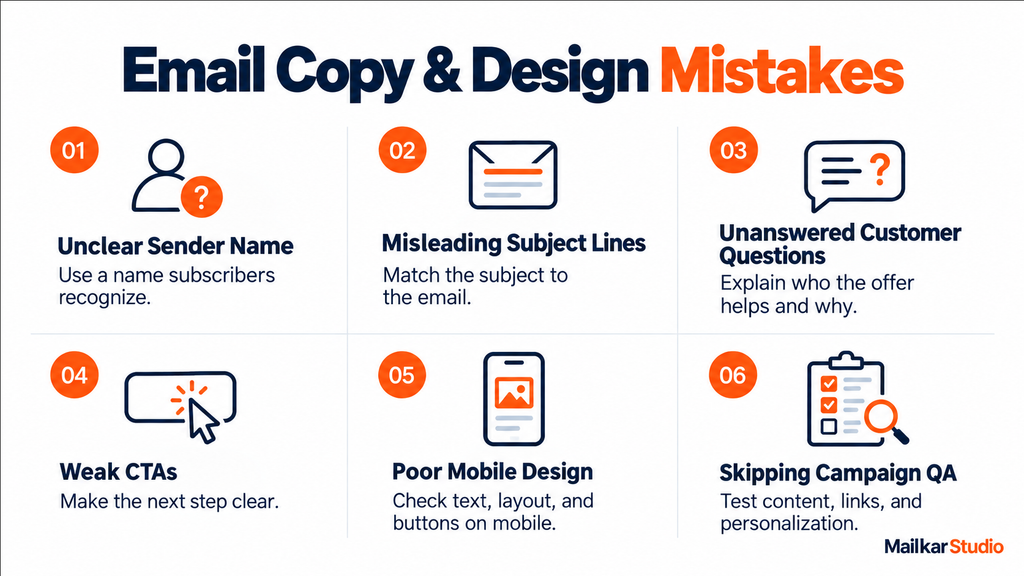
Once the audience is clear, the email must explain why the message matters. Its sender name, content, and layout should help readers understand the offer and take the next step.
6. Using an Unclear Sender Name
Subscribers may ignore a message when they cannot tell who sent it. A first name alone can be confusing if people only know your brand.
Use a familiar sender name, such as the business name or a person’s name with the brand. Keep it consistent across related campaigns.
Send through an email service provider, or ESP, using a properly configured business domain. An ESP manages campaigns, subscriber lists, and reporting.
Also check the reply-to address. Route customer replies to an inbox that someone monitors.
For example, a familiar brand name gives a first-time reader more context than an unknown employee name.
7. Writing Misleading Subject Lines
A subject line should match the email inside. False urgency or a promised discount that does not exist can damage trust.
Put the main benefit or update near the start. For example, “Your saved course starts next month” gives clear context when that information is correct.
Use preview text to add a useful detail. This is the short text shown beside or below the subject line.
Check both on a phone, where space is limited. There is no single subject-line length that works for every inbox.
Confirm that dates, discounts, and stock claims match the offer readers find after they click.
8. Selling Without Answering Customer Questions
Promotional emails can be useful, especially when subscribers joined for offers. Problems arise when every message asks for a purchase without explaining why the product fits their needs.
Match the content to the reader’s stage. A new lead may need a product comparison, while an existing customer may need refill advice.
Use plain language and a consistent brand voice. Explain benefits, answer common questions, and make offer terms easy to find.
You do not need a fixed content-to-promotion ratio. Each message needs a clear reason to reach that audience.
For a skincare offer, explain who the product suits and how to use it before asking for a purchase.
9. Using Weak CTAs and Unrelated Landing Pages
A call to action, or CTA, tells readers what to do next. Vague buttons and competing offers can make that step unclear.
Choose one primary action for a focused campaign. Button text such as “View Course Dates” explains more than “Click Here.”
Then check the destination. A course email should open the relevant course page, where dates and booking details are easy to find.
Newsletters can include several links. Use clear sections so readers can understand each option without searching through a crowded layout.
Open each CTA on a phone. Confirm that the page keeps the same offer and does not require extra searching.
10. Ignoring Mobile Design and Accessibility
Change block type or style
- Move Heading block from position 58 up to position 57
- Move Heading block from position 58 down to position 59
- Change text alignment
- Displays more block tools
Small text, crowded buttons, and wide layouts can make an email hard to use. A design that works in one inbox may also display differently elsewhere.
Use responsive email templates that adapt to the screen. Check key layouts in Gmail, Outlook, and Apple Mail, including dark mode where relevant.
Keep essential details in live text, and use clear contrast. Add useful alt text to meaningful images so their purpose remains clear when images are unavailable.
If layout faults keep returning, our email template audit service can help identify the cause.
Check the email with images turned off. The main message and next step should still make sense.
11. Skipping Campaign QA and Personalization Checks
Email quality assurance, or QA, checks the final campaign before it goes live. Without it, broken links or old offers can reach the full list.
Send a test and check the subject line, copy, prices, dates, images, and buttons. Follow the links through to the final action.
Preview personalization with different contact records. If a name is missing, a fallback should provide a natural greeting.
Review AI-written copy against approved product details too. Assign one person to approve the final version, and repeat checks after important edits.
Include a test profile with no first name. This helps catch greetings that work only when every field is complete.
A clear message still needs the right schedule. Check campaign timing alongside automated follow-ups to avoid unwanted overlap.
Email Timing and Automation Mistakes
A useful email can still arrive at the wrong moment. Review scheduled campaigns and automated flows together to understand what each subscriber may receive.
12. Sending Too Often or Going Quiet
A weekly newsletter can become overwhelming when several automated emails arrive on the same day. Long gaps create a different problem: subscribers may forget why they joined.
Set a sending schedule that matches what you promised and what you can deliver. Include campaigns and flows in the review.
Use frequency limits where your platform supports them, and check which messages those limits exclude.
Watch clicks, conversions, complaints, and unsubscribes when changing the schedule. These signals help you judge whether the change suits your audience.
Before adding another promotion, check whether the same contacts already receive a welcome or cart reminder that day.
13. Guessing Send Times
A set time that works for one audience may miss another. The account’s default time zone may also differ from the subscriber’s.
Start with the reader’s location and the purpose of the email. An event reminder must arrive with enough time to act.
Test other send times using comparable groups and a clear success measure. Avoid declaring one day or hour best for every business.
For automated emails, timing should reflect the action that triggered the message. A welcome email serves a different need from a renewal reminder.
14. Missing Welcome and Lifecycle Emails
Someone signs up, buys, or starts a trial, but receives no useful follow-up. That leaves an opportunity to answer questions or support the next step unused.
Start with a welcome email that delivers what the signup form promised. Explain what subscribers can expect next.
Then build flows around real customer needs. Ecommerce stores may need cart reminders and post-purchase advice; software firms may need trial onboarding.
Build and test the most useful flow first. A small set of working journeys is easier to manage than many unfinished ones.
For a trial signup, use the first follow-up to help the person complete the next useful setup task.
15. Leaving Automated Flows Unchecked
Automation needs review as products, offers, and customer data change. Otherwise, a flow may send an expired discount or remind someone about an order they already placed.
Check the trigger that starts each flow, its timing, and its exit rules. Exit rules stop messages when someone no longer qualifies.
For a cart reminder, confirm that purchase data reaches the platform before the next message. Delayed data can cause mistakes even when the rule looks correct.
Our email automation services help teams review these journeys and keep their setup aligned with customer actions.
Once timing and flow rules are checked, confirm that emails reach subscribers. Then review the tracking used to judge results.
Deliverability and Reporting Mistakes
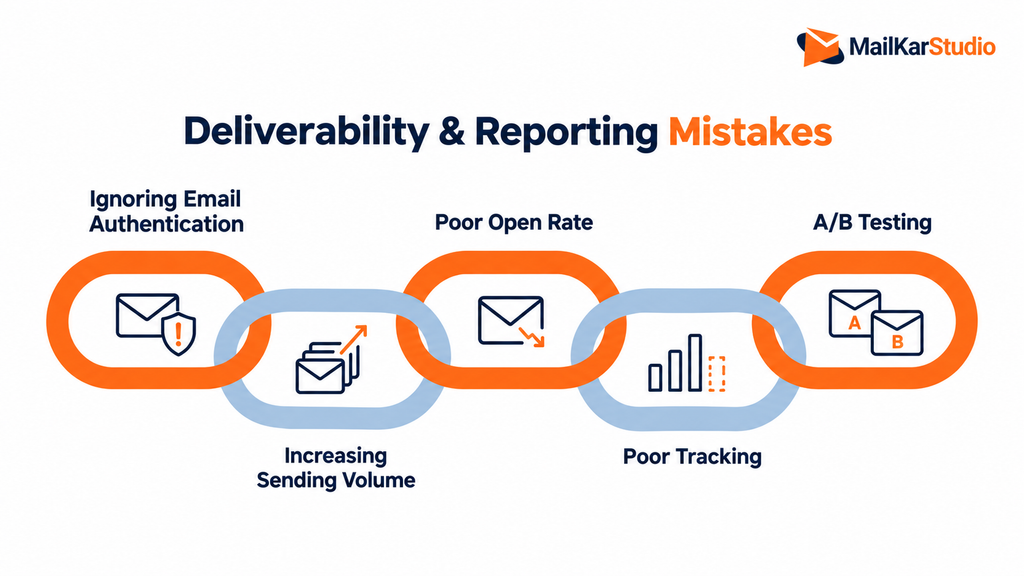
After checking the message and timing, review how emails are sent and measured. Delivery problems can limit reach, while weak tracking can hide what happens after a click.
16. Ignoring Email Authentication
Email authentication helps mailbox providers verify your sending setup. Missing or incorrect records can cause delivery problems.
Review SPF, DKIM, and DMARC with your ESP. SPF identifies approved sending systems, while DKIM adds a signature that receiving servers can check.
DMARC checks whether authentication aligns with the visible sender domain and sets a policy for failures.
Google requires all three for bulk senders to personal Gmail accounts. Its sender requirements also cover spam rates and unsubscribe support.
Authentication alone does not guarantee inbox placement. List quality, complaints, and sending habits still need attention.
17. Increasing Sending Volume Too Quickly
A new sending setup needs a controlled start. Suddenly sending a large campaign can create problems that are harder to spot and fix.
Increase volume gradually, starting with recent, engaged subscribers who expect your emails. Agree on the plan with your ESP, especially after a migration.
Monitor bounces, complaints, and temporary delivery delays before increasing volume again. A bounce means the message could not be delivered.
Check the reason for each failure. An invalid address needs a different response from a temporary server issue or a policy block.
Keep a record of each volume change. Compare delivery results before making the next increase.
18. Treating Open Rates as Proof of Success
An open does not confirm that someone read the email or wanted the offer. Privacy tools can affect the data.
Apple Mail Privacy Protection can inflate recorded opens. Separately, security tools may scan links and create clicks that did not come from readers.
Use available bot filtering, but do not assume it removes every automated event. Mailchimp’s bot-activity guidance explains these reporting limits.
Track click-through rate (CTR), the share of delivered emails that recorded a click. Then check results such as orders, bookings, or qualified leads.
Compare campaign reports with completed actions in your store or CRM. Investigate gaps before treating clicks as customer interest.
19. Sending Without Conversion Tracking
A recorded click shows that a link was followed. Conversion tracking shows whether a useful action, such as a purchase or signup, was completed.
Conversion rate shows the share of people who completed that action. Check which audience total your report uses to calculate it.
Use consistent campaign names and UTM tags. These tags help identify which email brought a visitor to your website.
Test the journey through to the final action and check that the event appears in your report.
Also review the attribution window, which defines how long a tool can credit an action to an email. Klaviyo’s attribution guide explains how those settings affect reported results.
Attributed revenue follows those rules; it does not prove that email alone caused every sale.
20. Running A/B Tests Without a Clear Plan
Changing the subject line, offer, and design together makes a simple test hard to interpret. You may see a difference without knowing what caused it.
For an A/B test, compare two versions with one main change. Use randomly split groups from the same eligible audience.
Choose the success measure and test period before sending. Allow enough time for the action you want to measure.
A few clicks may not provide a clear winner. Record the result, including uncertain findings, and use it to plan the next test.
Keep the audience rules and send conditions comparable. Otherwise, differences between the groups may explain the result.
Fix the Most Urgent Email Problems First
Start with mistakes that affect consent, delivery, or the customer’s ability to act. Small copy changes can wait while those problems remain.
Pause a campaign going to the wrong audience or a flow sending unwanted repeat messages. Then fix broken links, incorrect offers, and failed signup paths.
Next, review the point where results drop. If emails reach readers but few people click, check the offer, audience, and CTA.
If people click but do not buy or book, review the landing page and conversion tracking. This helps you address the actual problem.
A Pre-Send Email Marketing Checklist
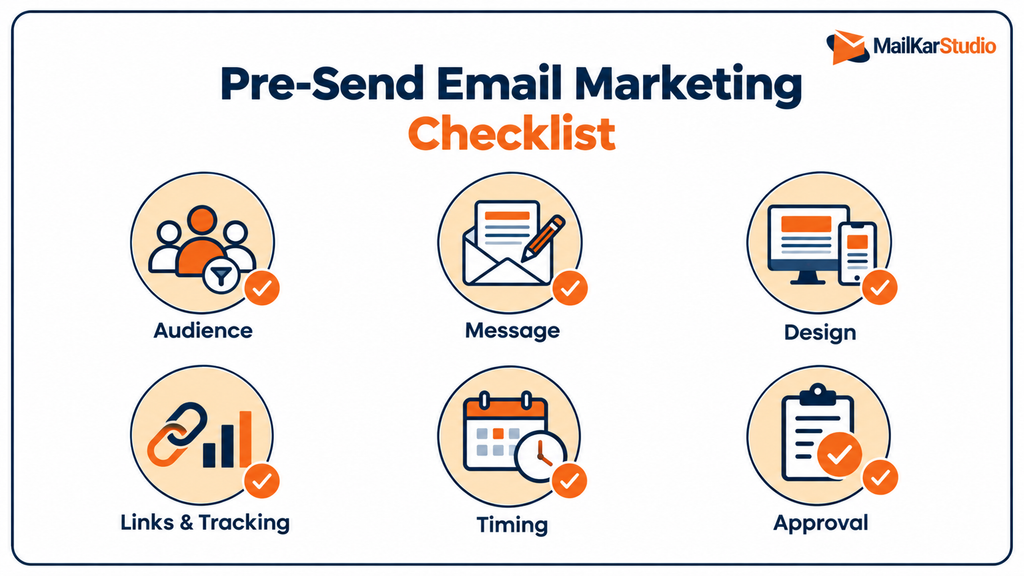
Use the same checks before each campaign. A shared checklist makes reviews more consistent and helps prevent repeat mistakes.
Audience: Confirm the segment, exclusions, consent records, and suppression list.
Message: Check the sender name, subject line, preview text, offer, and CTA.
Design: Review mobile display, key email clients, image loading, and accessibility.
Links and tracking: Test buttons, landing pages, forms, UTM tags, and conversion events.
Timing: Check the send date, time zone, frequency limits, and overlapping flows.
Approval: Confirm that the final version has been reviewed and approved.
Handle Email Mistakes After Sending
If an error reaches subscribers, first stop any scheduled messages that could repeat it. Then check how the mistake affects the reader.
A wrong event date or broken booking link may need a correction. A minor typo that leaves the meaning clear may not.
Keep a correction brief. Explain the error, provide the right details, and make the next step easy to find.
Afterward, update the workflow that allowed the mistake. Add the missing check so the next campaign receives a better review.
FAQs
What is the biggest email marketing mistake?
Sending without understanding the audience creates problems across targeting, content, and timing. Start by identifying who needs the message and what useful action they can take.
How often should a business send marketing emails?
Use the frequency subscribers expect and a schedule you can support with useful content. Count automated emails too, then review conversions, complaints, and unsubscribes before increasing sends.
Why do my emails get opens but few clicks?
The offer may not fit the audience, or the CTA may be unclear. Recorded opens may also include privacy-tool activity, so check the email, landing page, and filtered reports together.
Should I remove subscribers who never open emails?
Do not decide from open data alone. Review clicks, purchases, and other activity, then use a suitable re-engagement and suppression process.
Is using AI for email copy a mistake?
AI can help with drafts and variations, but the final copy still needs review. Check facts, offer terms, tone, and audience fit before sending.
Find the Gaps in Your Email Program
Repeated errors need a review of the process behind each send. Share your ESP name, campaign goals, and reports from the last 90 days.
Our email program audit service gives you three priority fixes in the order to address them. Once we agree on the scope and receive the reports, we will send your review and next steps within 48 hours.
About the author